
NocoDB
A spreadsheet-style platform with a self-hosted option. Start by identifying the edition, intended use and data connection your team needs.
Investigate NocoDB when a spreadsheet-style interface is part of the workflow. Confirm the required data connection and feature availability in your chosen release.
Do not assume that self-hosting makes every feature free or that the current licence matches older open-source descriptions.
What the documentation establishes.
These are source-backed statements. The scope column keeps an edition claim separate from a test result.
| Question | Documented answer | Scope and source |
|---|---|---|
| Current community licence | The self-hosting documentation identifies the Fair Code Sustainable Use License. Review the full terms for the intended use. | Current Community documentation; older release terms must be checked separately.Read primary source ↗ |
| Installation paths | Official paths distinguish a local quickstart, a single-server HTTPS installation and custom infrastructure. | Documented choices; these installations have not been executed by this site.Read primary source ↗ |
| Paid edition boundary | The documentation directs requirements such as SSO and audit logs to paid-plan licensing. Verify the exact plan before making them mandatory. | Availability is plan-dependent; no complete current entitlement matrix is claimed.Read primary source ↗ |
Ask these first.
- Which release and licence apply to your intended use?
- Does the chosen edition support your specific data source and required operations?
- Which users need access controls or auditing beyond the basic workflow?
Our evaluation approach: a candidate stays on the shortlist only when it meets your essential workflow and your team can maintain it. This is editorial guidance, not a product test score.
Make the choice observable.
- Record the intended edition and pin the release before evaluation.
- Use synthetic rows and a separate test data source.
- Exercise the actual read, create, update and export operations you need.
- Test each user role rather than relying on an administrator demonstration.
- Rehearse recovery and document which persistent stores it requires.
Suggested evaluation steps. This site has not completed this rehearsal or measured its success rate.
Choose the guide for your next task.
NocoDB Licensing: Match the Terms to Your Use
Understand current NocoDB licensing, distinguish internal use from providing access, and record the release and intended use before deployment.
Read the workflow ↗Workflow guideNocoDB Self-Hosted vs Cloud: Who Owns the Work?
Choose NocoDB hosting by operations, required features, recovery responsibility and access needs rather than assuming self-hosting removes all costs.
Read the workflow ↗Technical referenceNocoDB Server Requirements: Plan and Verify Capacity
Distinguish official NocoDB minimums from production recommendations, then create a capacity rehearsal for your own workload and storage needs.
Read the workflow ↗Technical referenceNocoDB Database Connections: Keep the Roles Separate
Distinguish NocoDB primary storage from external integrations and imported copies, then verify connector behavior with a separate test dataset.
Read the workflow ↗Migration guideNocoDB CSV Import: Preserve Types and Record Identity
Prepare a NocoDB CSV import, distinguish identifiers from display values, and validate dates, decimals and duplicates before accepting the result.
Read the workflow ↗Workflow guideNocoDB Links, Lookups and Rollups: Choose the Right Field
Model relationships in NocoDB, distinguish a lookup from an aggregate, and validate linked-record results with a small worked example.
Read the workflow ↗Workflow guideNocoDB Formulas: Validate Calculations Before Migration
Build a small NocoDB formula fixture, distinguish numbers from text and missing values, and reconcile results against explicit expected outputs.
Read the workflow ↗Workflow guideNocoDB Forms: Design Intake and Check Access
Plan a NocoDB intake form with a minimal field set, separate internal status from submitted data, and verify the shared experience before launch.
Read the workflow ↗Technical referenceNocoDB API Tokens: Check Scope and Edition Limits
Distinguish NocoDB fine-grained and legacy tokens, understand Community scope limitations, and verify allowed and denied integration operations.
Read the workflow ↗Technical referenceNocoDB API Pagination: Retrieve and Reconcile Every Page
Follow current NocoDB v3 record pagination correctly, distinguish base-list paging, and reconcile exported IDs without treating the first response as complete.
Read the workflow ↗Workflow guideNocoDB Backup and Restore: Define the Complete Recovery Set
Inventory NocoDB database, attachments and configuration, choose a consistent recovery point, and plan an isolated restore acceptance check.
Read the workflow ↗Workflow guideNocoDB Upgrades: Pin Versions and Preserve a Way Back
Prepare a NocoDB upgrade by recording storage layout, release changes and a recovery point, then verify the workflows that determine acceptance.
Read the workflow ↗Inspect the interface, with its context.
Open a specimen to see the source image and the observations it supports. A vendor demonstration is distinct from a self-hosted installation.
NocoDBHistorical vendor product image · Image identifies v2.3; not the current release
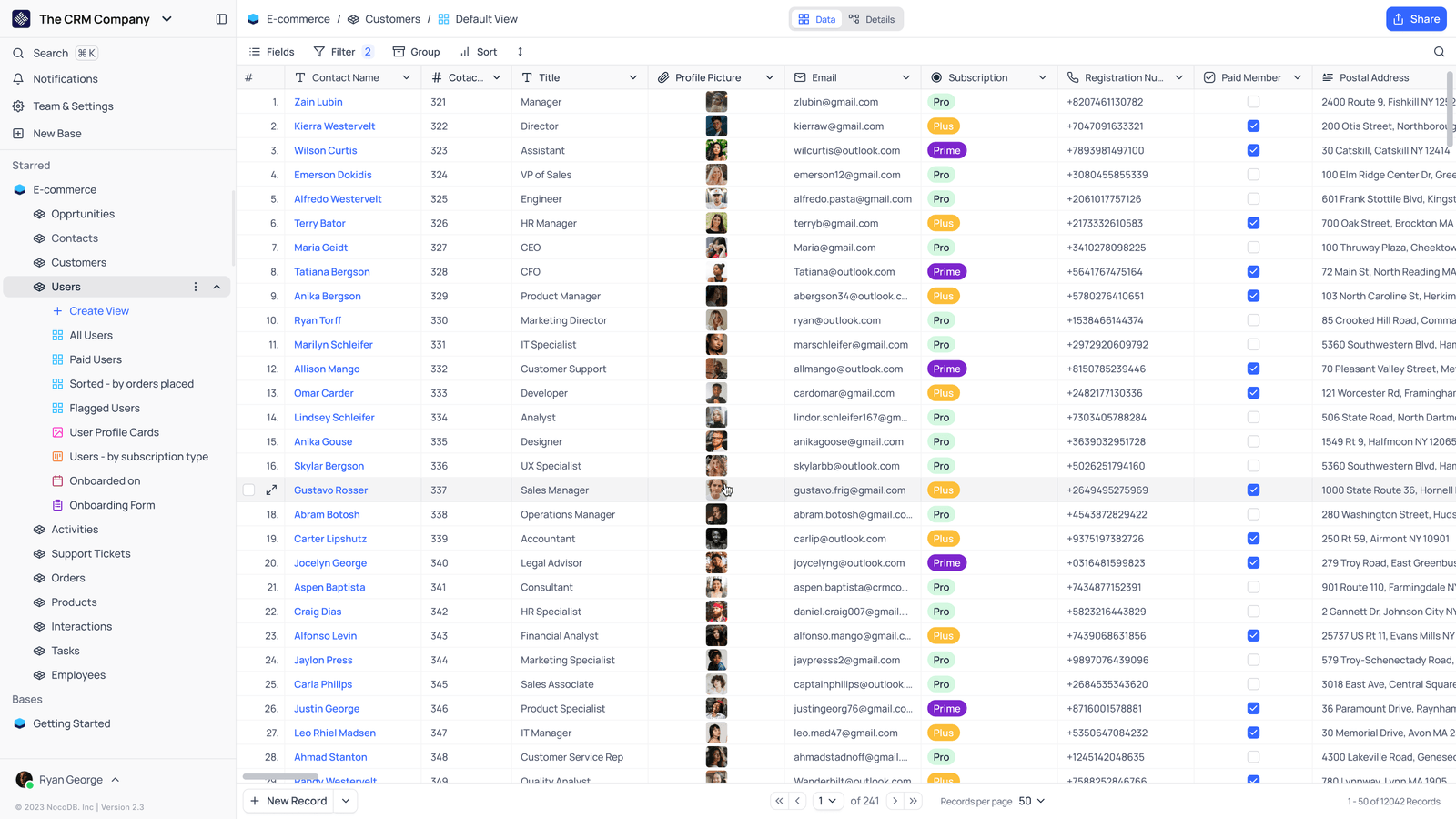
- Saved viewsThe vendor image shows several named views in the left navigation.
- Grid controlsFields, filtering, grouping and sorting appear above the record grid.
- Typed columnsThe example includes text, email and labelled select values. Check the current edition for availability.
Evidence we are still building.
We have not established independent resource measurements, migration completeness, restore reliability or a full edition-by-edition permission matrix. The interface evidence above retains its original capture date and version; it is not a new installation test.