
Resolve licensing classification before choosing an edition or offering NocoDB access.
Identify the Release Before the Label
The official licence explanation dates the transition from AGPL-3.0 to January 9, 2026. It distinguishes internal use from offering the product itself to external customers. Read the licence included with the exact release you intend to run; do not infer its terms from an older tutorial.
Create a short decision record containing the repository, tag or commit, edition, deployment owner and proposed users. Save the relevant licence reference with the decision. That makes a later update review possible without trying to reconstruct which terms someone saw months earlier.
Documentation: NocoDB licence: Sustainable Use License
Describe What People Will Actually Access
Hypothetical example: an operations team uses a private NocoDB instance to track its own equipment. Compare that with an agency charging clients to log into a branded NocoDB workspace. Both involve self-hosting, but the access arrangements differ. Describe the service rather than choosing a convenient label such as internal tool.
Useful details include who signs in, whether customers interact with NocoDB itself, what the customer buys and whether the software is redistributed. Send unresolved facts to the licensor for clarification. This guide organizes the questions; it does not determine a legal right for a particular business.
- List employees, contractors and external customers separately.
- Describe the screens and APIs each group can access.
- Record whether payment buys access to NocoDB itself.
- Compare that description with the exact licence and request clarification when it does not fit cleanly.
Separate Permission to Use from Feature Availability
A licence permitting your use does not establish that a required capability ships in the selected edition. Prepare a second list for authentication, audit, sharing and integration requirements. Assess each against an edition-specific source. Keep this feature assessment separate from the licence question so neither silently answers the other.
For procurement, retain the unanswered requirement rather than writing “free and unlimited” across the whole platform. A clear unresolved condition is more useful than a confident statement that later prevents the project from going live.
Revisit the Decision When the Use Changes
Repeat the review when upgrading across a licence boundary, exposing new customer access, reselling a service or changing distribution. A decision that fits a private team today may not describe a customer-facing offering next year. Make the owner of that review explicit in the change checklist.
Hypothetical licence review record; not a legal determination
This is an illustrative worksheet to adapt to your own evaluation. It is not a measured product test or a claim about results in your installation.
| Decision field | Record | Why it matters |
|---|---|---|
| Release | Exact tag or commit | Avoids applying historical terms to a different release |
| Audience | Staff, contractors, customers | Describes actual access |
| Commercial offering | What the customer pays for | Clarifies the proposed use |
| Unresolved point | Question sent to licensor | Prevents assumptions becoming approvals |
Keep a versioned licence decision and a separate edition checklist. Review the actual access arrangement before expanding it.
Inspect the official interface evidence
These previously captured interfaces provide orientation. Their versions and dates are distinct from the documentation review above.
Inspect the interface, with its context.
Open a specimen to see the source image and the observations it supports. A vendor demonstration is distinct from a self-hosted installation.
NocoDBHistorical vendor product image · Image identifies v2.3; not the current release
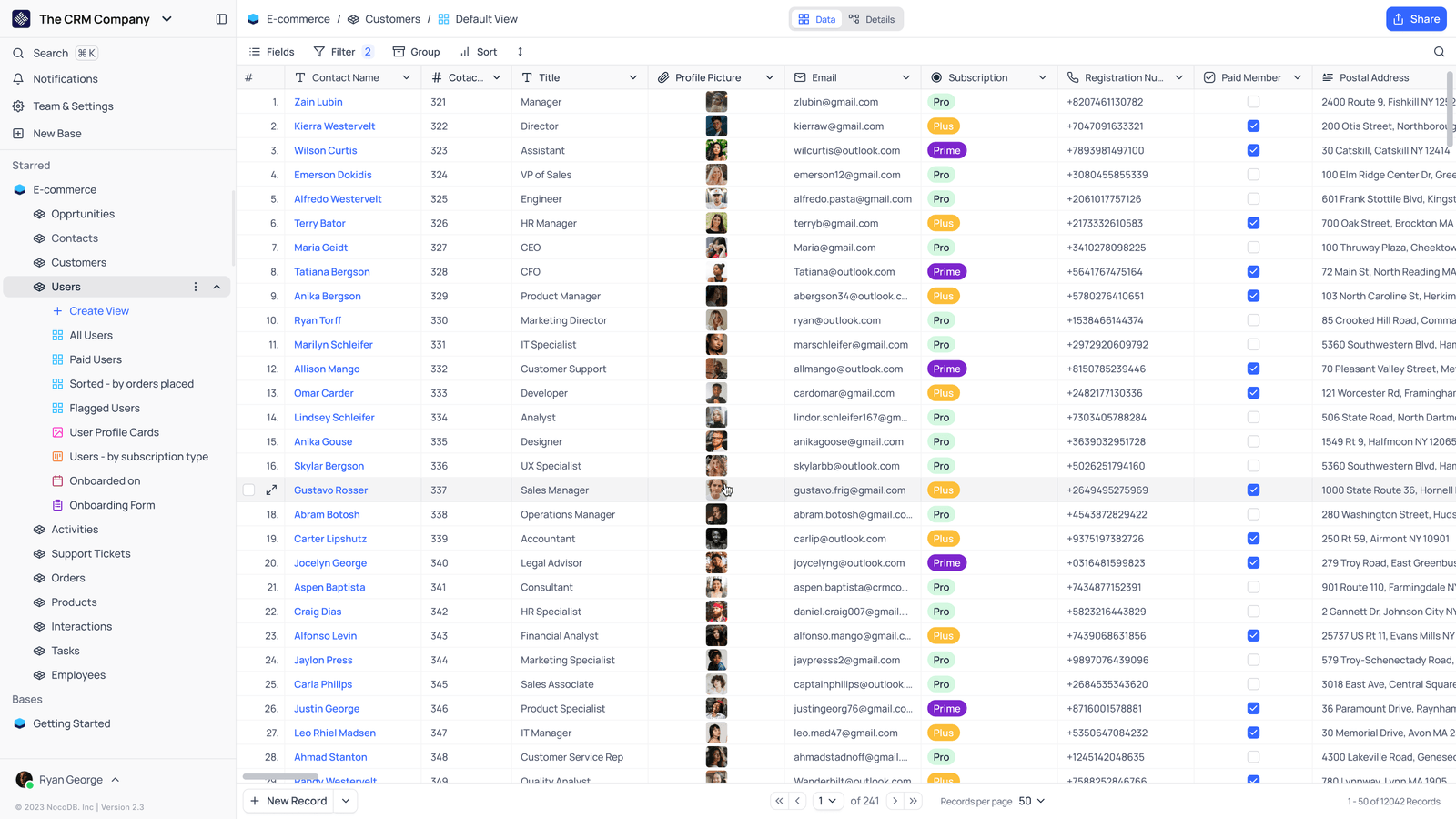
- Saved viewsThe vendor image shows several named views in the left navigation.
- Grid controlsFields, filtering, grouping and sorting appear above the record grid.
- Typed columnsThe example includes text, email and labelled select values. Check the current edition for availability.
Check the facts and their boundaries.
Official documentation supports the product statements. The evaluation procedures and synthetic examples are editorial guidance. We have not independently run the installation, migration or recovery procedures described here.
Current vendor explanation, updated October 2026; exact release licence and intended use still govern. Reviewed 2026-11-01.