
Grist
A spreadsheet-centered way to work with structured information. Its document model makes the distinction between a document backup and full installation recovery especially useful.
Investigate Grist when your team wants spreadsheet-style work with related records. Evaluate a representative document instead of assuming your existing workbook translates directly.
A downloaded document and a backup of the full installation have different scopes. Account access, external attachments and configuration need their own recovery plan.
What the documentation establishes.
These are source-backed statements. The scope column keeps an edition claim separate from a test result.
| Question | Documented answer | Scope and source |
|---|---|---|
| Core licence | The grist-core repository licence is Apache 2.0. | Core repository main branch; other editions require their own review.Read primary source ↗ |
| Document storage | The self-hosting guide distinguishes SQLite-based .grist document files from the home database that stores installation metadata. | Documented storage model; configured installations may add other services.Read primary source ↗ |
| Backup boundary | A downloaded .grist document excludes sharing information. External attachments need separate export and restoration. | Document export guidance; not proof of complete instance recovery.Read primary source ↗ |
Ask these first.
- Which formulas and record relationships must the document represent?
- Will attachments live inside the document or in external storage?
- How will the restored installation recover users, sharing and configuration?
Our evaluation approach: a candidate stays on the shortlist only when it meets your essential workflow and your team can maintain it. This is editorial guidance, not a product test score.
Make the choice observable.
- Create a synthetic document with two related tables and a calculation.
- Include an attachment and record its storage location.
- Download the document and reopen it in a separate test destination.
- Check formulas, linked records and attachment availability.
- Separately inventory the home database, authentication and storage configuration.
Suggested evaluation steps. This site has not completed this rehearsal or measured its success rate.
Choose the guide for your next task.
Grist CSV and Excel Imports Without Silent Data Changes
Prepare CSV and Excel data for Grist, choose a merge key, inspect import previews and reconcile records before accepting an import.
Read the workflow ↗Workflow guideGrist Reference Columns: Link Records by Identity
Understand Grist reference columns, reference lists and display labels, with a customer/project example and checks for ambiguous matches.
Read the workflow ↗Technical referenceGrist Formulas: Validate Calculations Before Reuse
Plan and validate Grist formula columns with Python-aware identifiers, boundary cases and a worked service-invoice calculation.
Read the workflow ↗Workflow guideGrist Summary Tables: Reconcile Groups and Totals
Choose meaningful group fields in Grist, distinguish sums from averages and reconcile a hypothetical project-status report.
Read the workflow ↗Workflow guideGrist Linked Widgets: Build a Clear Master–Detail Page
Plan Grist selection and filter links with a customer/project example, then check empty states and avoid confusing layout with security.
Read the workflow ↗Technical referenceGrist Access Rules: Verify Who Can Read and Change Data
Plan a Grist permission matrix, distinguish filters from access controls and verify allowed and denied behavior using synthetic accounts.
Read the workflow ↗Workflow guideGrist Forms: Design and Verify a Submission Workflow
Build a Grist form around a clear destination table, test required fields and inspect the difference between previewing and publishing.
Read the workflow ↗Technical referenceGrist REST API: Identify Records Before Automating Writes
Plan a Grist API integration using documented bearer authentication, table and column IDs, read-first checks and controlled update behavior.
Read the workflow ↗Workflow guideGrist Document Backups: Know What a .grist File Preserves
Distinguish a Grist document download from full installation recovery and plan a synthetic restore check with sharing and attachment boundaries.
Read the workflow ↗Technical referenceGrist External Attachments: Keep Files and Records Recoverable
Understand the recovery boundary of external Grist attachments, prepare paired artifacts and reconcile files after restoring a document.
Read the workflow ↗Technical referenceGrist Self-Hosting Storage: Inventory the Persistent State
Map Grist documents, home metadata, sessions and configured external services so an installation recovery plan covers more than one file.
Read the workflow ↗Technical referenceGrist Authentication: Plan OIDC or SAML With an Access Check
Separate Grist sign-in from document authorization, check current edition requirements and validate identity-provider changes without guessing configuration.
Read the workflow ↗Inspect the interface, with its context.
Open a specimen to see the source image and the observations it supports. A vendor demonstration is distinct from a self-hosted installation.
GristOfficial public demo · Demo identifies v1.7.20
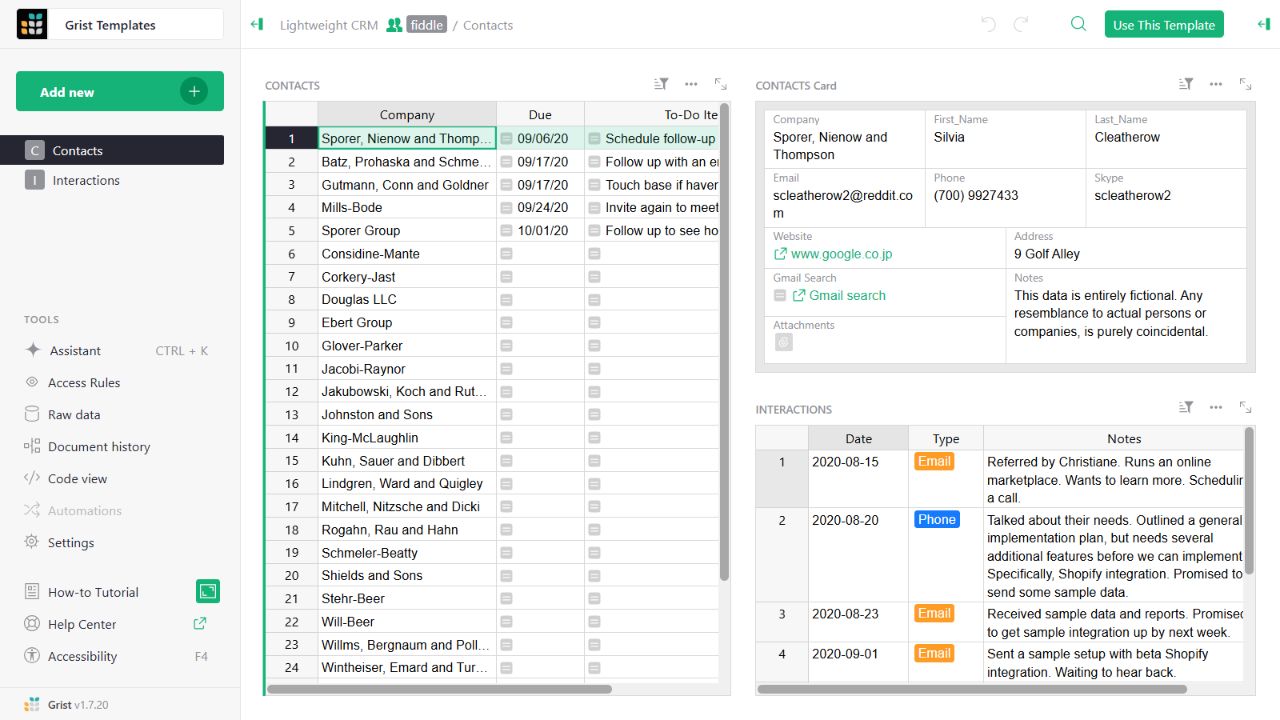
- Contact gridThe left widget lists sample companies and follow-up tasks.
- Detail cardThe upper-right widget presents fields for the selected contact.
- Related interactionsThe lower-right widget displays the sample interaction history.
Evidence we are still building.
We have not established independent resource measurements, migration completeness, restore reliability or a full edition-by-edition permission matrix. The interface evidence above retains its original capture date and version; it is not a new installation test.