
Prevent a restored document from being mistaken for a complete restoration of its externally stored files.
Establish Where Files Live
Grist’s Document Settings guide distinguishes internal and external attachment placement. Availability depends on the installation’s configuration. Review the actual document setting instead of inferring storage from whether a file opens in your browser.
For a hypothetical equipment register, create a manifest describing the record code, expected file and why it matters. A maintenance PDF attached to the wrong equipment row is not an acceptable restore even if the total file count matches.
Documentation: Grist: Document Settings
Treat the Artifacts as a Recovery Set
The export guide describes downloading attachments separately and using a .tar archive for external-attachment restoration. Its restore procedure assigns that action to the document owner. Keep the current official procedure with the recovery record.
Give the document copy and its associated attachment artifact a shared recovery-set identifier. Record their capture times. If active users can change files while the set is assembled, describe that gap and plan how to reconcile changes rather than pretending two separate downloads form an automatically consistent snapshot.
Documentation: Grist: Exports and Backups
Verify the File-to-Record Relationship
Choose synthetic equipment E-10 and E-20 with visibly different sample documents. Include one record with no file. Write the expected association before restoring anything. This helps separate “missing file” from a record that was never supposed to have one.
- Confirm the source document’s attachment placement.
- Retain the document artifact and separate attachment artifact together.
- Restore the document in an isolated destination.
- Follow the documented missing-attachment restoration procedure.
- Open each sample file from its intended equipment record.
- Check the expected no-attachment record remains a valid empty case.
Documentation: Grist: Exports and Backups · Grist: Document Settings
Diagnose the Layer That Is Missing
When rows are present but files fail, inspect the recovery-set manifest and attachment procedure before reimporting the row data. Repeating a table import can introduce duplicate records while leaving the storage problem untouched.
For ongoing operations, assign ownership of storage credentials, retention and file recovery. A person able to edit equipment descriptions may not be the person able to restore the attachment store. Document the handoff so recovery is not delayed by a missing administrator or an unknown storage account.
Hypothetical external-file recovery manifest
This is an illustrative worksheet to adapt to your own evaluation. It is not a measured product test or a claim about results in your installation.
| Record | Expected File | Verification |
|---|---|---|
| E-10 | Synthetic pump manual | Opens from E-10 after restoration |
| E-20 | Synthetic motor inspection | Opens from E-20, not E-10 |
| E-30 | No attachment | Blank is intentional |
| Recovery set R-07 | Document plus attachment archive | Both artifacts retained and associated |
Restored rows and restored files must be checked together at the relationship level, not only by counting artifacts.
Inspect the official interface evidence
These previously captured interfaces provide orientation. Their versions and dates are distinct from the documentation review above.
Inspect the interface, with its context.
Open a specimen to see the source image and the observations it supports. A vendor demonstration is distinct from a self-hosted installation.
GristOfficial public demo · Demo identifies v1.7.20
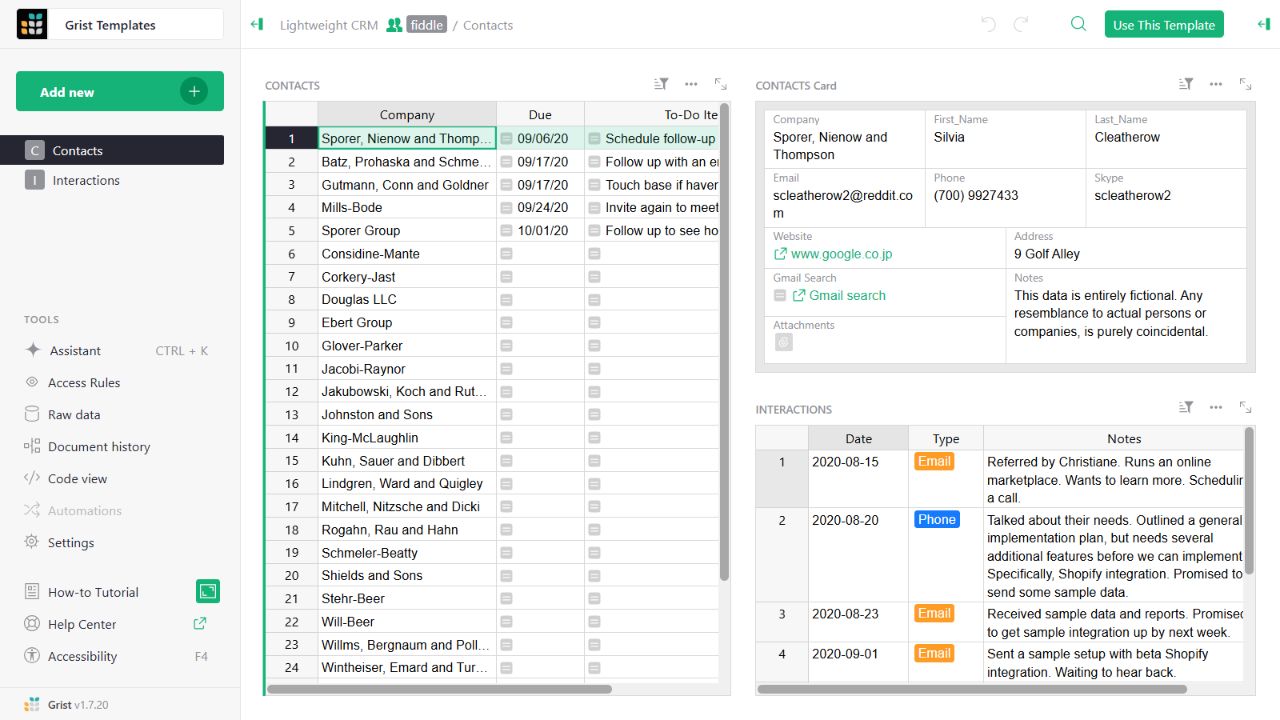
- Contact gridThe left widget lists sample companies and follow-up tasks.
- Detail cardThe upper-right widget presents fields for the selected contact.
- Related interactionsThe lower-right widget displays the sample interaction history.
Check the facts and their boundaries.
Official documentation supports the product statements. The evaluation procedures and synthetic examples are editorial guidance. We have not independently run the installation, migration or recovery procedures described here.
Document downloads, excluded sharing information and separate external-attachment restoration. Reviewed 2026-11-01.
Attachment placement, document settings and configured availability. Reviewed 2026-11-01.