
Translate a real authorization requirement into an explicit and reviewable access test.
Start With an Action Matrix
For a hypothetical service company, technicians need assigned jobs and job notes, while a finance role needs invoice details. That does not mean every technician should read every invoice or that a finance user should edit every operational field. Write the necessary actions individually.
Separate reading, creating, changing and deleting. Also decide whether someone can change assignment fields or their own role. A policy that only checks the visible page can miss a more consequential path through a different table or operation.
Use the Documented Rule Controls
Grist’s access guide describes owner-managed document rules, including row and column controls. It also provides View As inspection so an owner can examine another user’s perspective. Check the current guide and the intended edition before implementing a policy.
Use readable rule names and a short business reason. Keep a copy of the intended matrix outside the document so an accidental rule change does not also rewrite the only description of what should have happened.
Documentation: Grist: Access Rules
Check Both Allowed and Denied Outcomes
Make a synthetic document and separate test identities for each relevant role. View As is useful for inspection, but also plan explicit checks of actual actions through the interfaces your workflow uses. Never use real customer data to discover whether a restriction works.
- Confirm that the expected assigned job is readable.
- Attempt to read a deliberately unassigned synthetic job.
- Attempt an allowed note update and an unrelated protected-field update.
- Check the raw-data perspective as well as the prepared page.
- Recheck after changing a user’s role or a job’s assignee.
- Record each expected denial alongside each expected success.
Documentation: Grist: Access Rules
Review Rules When the Workflow Changes
A new table, column or integration can create an access question even when no existing rule was intentionally changed. Add permission review to those changes. The person adding a field should state who needs it and whether it contains sensitive information.
If a restricted account sees too much, pause sharing of the affected document and isolate the narrow policy problem before broadening access to make an error disappear. This guide describes a review method; it does not certify a particular installation’s security or compliance.
Hypothetical role/action acceptance matrix
This is an illustrative worksheet to adapt to your own evaluation. It is not a measured product test or a claim about results in your installation.
| Role and Action | Expected | Evidence to Record |
|---|---|---|
| Technician reads assigned job | Allowed | Synthetic job ID and user |
| Technician reads another team’s invoice | Denied | Restricted identity and attempted path |
| Finance updates invoice status | Allowed | Before/after status |
| Technician changes own role | Denied | Policy boundary remains intact |
A permission review is incomplete until it records expected failures as carefully as successful actions.
Inspect the official interface evidence
These previously captured interfaces provide orientation. Their versions and dates are distinct from the documentation review above.
Inspect the interface, with its context.
Open a specimen to see the source image and the observations it supports. A vendor demonstration is distinct from a self-hosted installation.
GristOfficial public demo · Demo identifies v1.7.20
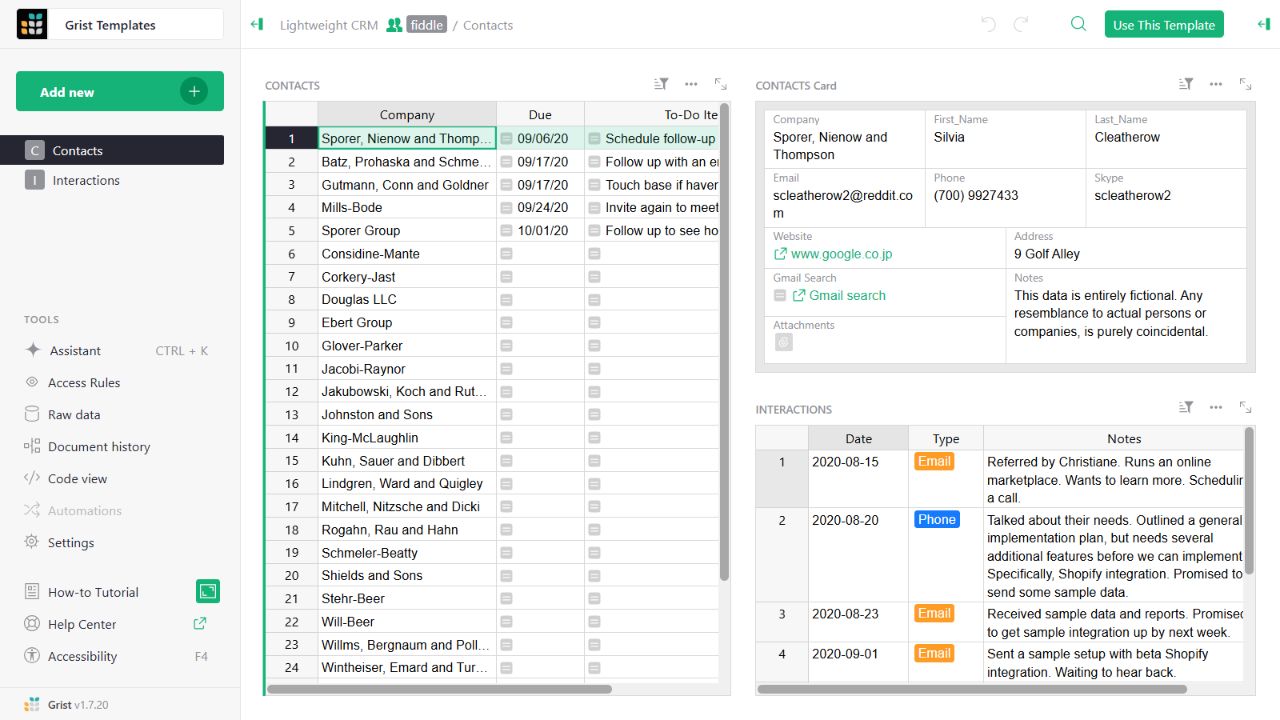
- Contact gridThe left widget lists sample companies and follow-up tasks.
- Detail cardThe upper-right widget presents fields for the selected contact.
- Related interactionsThe lower-right widget displays the sample interaction history.
Check the facts and their boundaries.
Official documentation supports the product statements. The evaluation procedures and synthetic examples are editorial guidance. We have not independently run the installation, migration or recovery procedures described here.
Document-owner rules, row/column access and View As inspection. Reviewed 2026-11-01.