
Create a repeatable calculation contract instead of copying spreadsheet expressions without checking their meaning.
Understand the Calculation Model
The official guide describes formula columns that apply their expression across rows. Column references use identifiers such as $Hours, and identifiers are case-sensitive. Python functions and Grist’s uppercase spreadsheet-like functions have different naming conventions.
Before converting an existing data column, preserve its values in a copy or export. A computed column and a manually entered column serve different purposes: the former expresses a rule, while the latter may contain historical overrides. Decide whether those overrides are valid business exceptions before replacing them.
Documentation: Grist: Intro to Formulas
Write the Business Rule First
For a hypothetical repair team, a labor charge is Hours multiplied by HourlyRate. Two hours at 75 produces 150; half an hour at 80 produces 40. Those arithmetic expectations are examples, not observed Grist output.
Decide what a missing rate means. It may mean “not priced yet,” which is different from a genuine zero-cost visit. A calculation that silently treats both as zero can produce a polished but misleading invoice. Add a separate review condition for incomplete inputs rather than hiding the distinction in formatting.
Translate the Rule Into a Test Column
Check the exact column IDs shown by your document before entering an expression such as $Hours * $HourlyRate. Use a synthetic table first. If a column was renamed, verify its identifier rather than guessing that the visible label is the expression name.
Review the current guide for column behavior and helper syntax. When a rule changes, keep its business definition and example expectations together so a future editor can tell whether a different output is an intended change or an error.
- Create ordinary, fractional, zero and incomplete example rows.
- Calculate expected results independently.
- Enter the expression using the document’s actual identifiers.
- Inspect errors and data types rather than only cell formatting.
- Change one input and confirm the relevant output recalculates.
Documentation: Grist: Intro to Formulas
Keep Totals and Exceptions Understandable
If the task is a subtotal across many rows, use a separate summary rather than inventing a special total row inside a table of visits. That keeps one row’s meaning consistent and makes row-level calculations easier to reason about.
For a lookup-based calculation, verify which record is selected and what happens when no match exists. A correct multiplication cannot repair an incorrect customer rate. Save the expected-output worksheet with the calculation’s owner and the date its rule was approved.
Hypothetical labor-charge expectations
This is an illustrative worksheet to adapt to your own evaluation. It is not a measured product test or a claim about results in your installation.
| Inputs | Expected Outcome | Reason |
|---|---|---|
| 2 hours × 75 | 150 | Ordinary multiplication |
| 0.5 hours × 80 | 40 | Fractional quantity |
| 0 hours × 75 | 0 | Genuine zero quantity |
| 2 hours × missing rate | Needs review | Unpriced is not the same as free |
A useful formula includes an explicit rule, a known set of expected outputs and a visible treatment of incomplete data.
Inspect the official interface evidence
These previously captured interfaces provide orientation. Their versions and dates are distinct from the documentation review above.
Inspect the interface, with its context.
Open a specimen to see the source image and the observations it supports. A vendor demonstration is distinct from a self-hosted installation.
GristOfficial public demo · Demo identifies v1.7.20
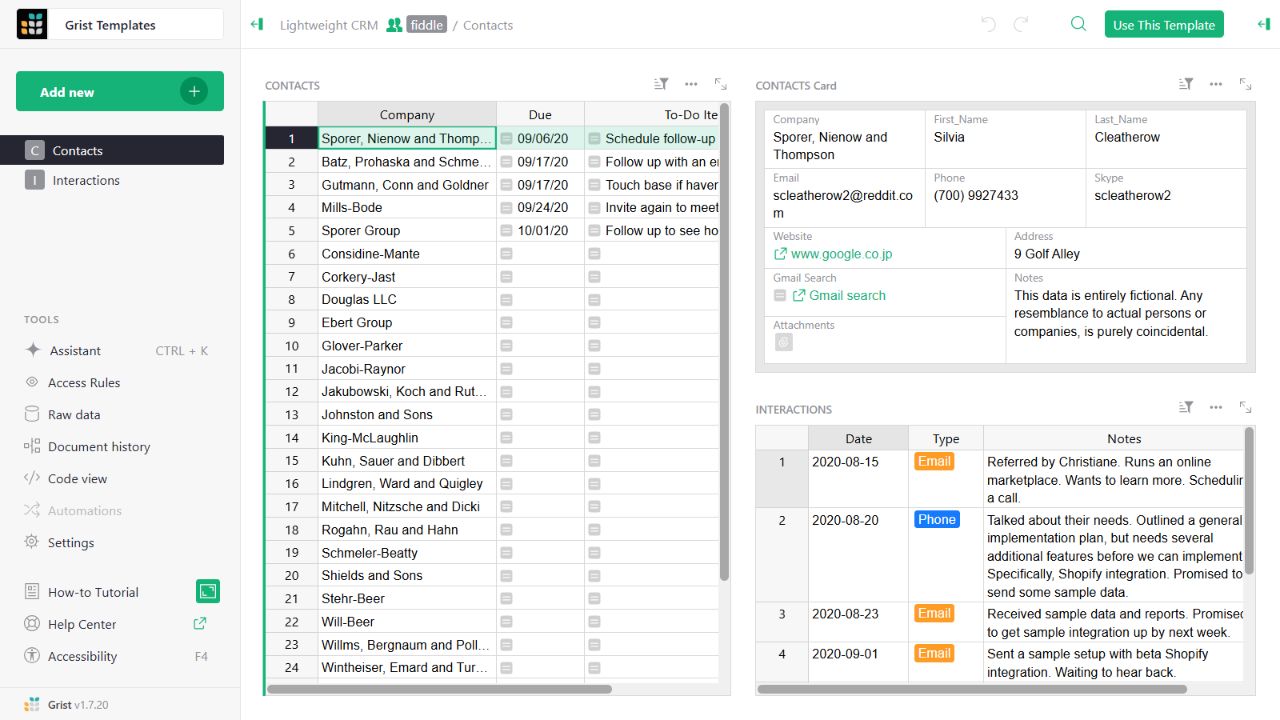
- Contact gridThe left widget lists sample companies and follow-up tasks.
- Detail cardThe upper-right widget presents fields for the selected contact.
- Related interactionsThe lower-right widget displays the sample interaction history.
Check the facts and their boundaries.
Official documentation supports the product statements. The evaluation procedures and synthetic examples are editorial guidance. We have not independently run the installation, migration or recovery procedures described here.
Python expressions, column behavior and case-sensitive identifiers. Reviewed 2026-11-01.