
Choose and verify an authentication configuration without confusing successful sign-in with appropriate document access.
Separate Sign-In From Authorization
Grist’s authentication overview documents multiple deployment approaches. Choose one that fits the identity system you actually operate instead of assuming every installation uses the same hosted login service.
A hypothetical contractor may successfully authenticate yet still need no access to the finance document. Conversely, a recognized employee may need a workspace invitation or a particular document role. Treat those as separate checks; a working sign-in button does not establish the intended access policy.
Documentation: Grist: Authentication Overview
Check the Current OIDC and SAML Requirements
The current official OIDC and SAML pages state an activation-key/full-edition requirement. Eligibility for a free activation key is a separate vendor policy to review, not a reason to assume unrestricted SSO in every package. Record the intended release and edition before following a provider-specific setup.
OIDC documentation identifies issuer, client and callback configuration. Use the exact current instructions for your provider and deployment hostname. Keep the client secret in the approved secret store and its reference in the operating record. Do not paste it into this site or a public example.
Documentation: Grist: OpenID Connect · Grist: SAML
Verify Identity and Access Together
Use synthetic identities representing a regular employee, a contractor and a person who should not receive document access. Plan a way to recover administrative access before switching a production identity configuration. The following is a proposed verification procedure, not a claim that this site configured an identity provider.
- Confirm the application hostname and registered callback match the intended deployment.
- Sign in with an allowed synthetic identity.
- Verify the identity attributes used to recognize that person.
- Check expected workspace and document access.
- Attempt access that the role must not have.
- Check sign-out, fresh sign-in and the documented account-removal workflow.
Documentation: Grist: OpenID Connect · Grist: SAML · Grist: Access Rules
Diagnose the Failing Layer
If authentication fails, inspect provider registration, deployment URL and the current documented configuration first. If sign-in succeeds but a document is unavailable, inspect sharing and access policy rather than broadening authentication settings. Keep safe error details that identify the failing stage without exposing tokens.
A change of identity provider can also alter how an existing person is recognized. Review that mapping before inviting everyone again or creating replacement accounts. Record the administrator responsible for the provider and the administrator responsible for Grist so an issue has a clear handoff.
Hypothetical sign-in and authorization acceptance
This is an illustrative worksheet to adapt to your own evaluation. It is not a measured product test or a claim about results in your installation.
| Identity | Sign-In Expectation | Document Expectation |
|---|---|---|
| Employee A | Allowed through intended provider | Only assigned business access |
| Contractor B | According to approved policy | No finance document access |
| Uninvited identity C | Provider behavior recorded | No unintended workspace access |
| Administrator | Recovery path documented | Can review and repair configuration |
A correct sign-in configuration identifies users consistently and leaves the intended document permissions intact.
Inspect the official interface evidence
These previously captured interfaces provide orientation. Their versions and dates are distinct from the documentation review above.
Inspect the interface, with its context.
Open a specimen to see the source image and the observations it supports. A vendor demonstration is distinct from a self-hosted installation.
GristOfficial public demo · Demo identifies v1.7.20
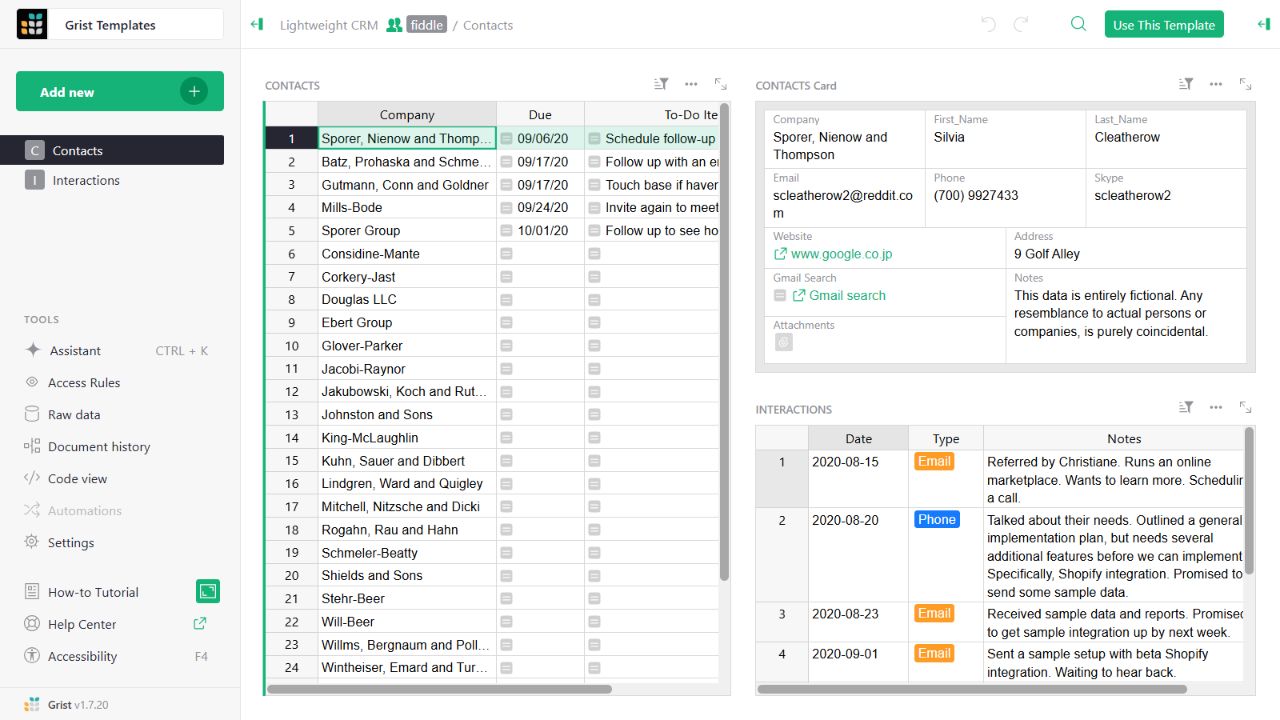
- Contact gridThe left widget lists sample companies and follow-up tasks.
- Detail cardThe upper-right widget presents fields for the selected contact.
- Related interactionsThe lower-right widget displays the sample interaction history.
Check the facts and their boundaries.
Official documentation supports the product statements. The evaluation procedures and synthetic examples are editorial guidance. We have not independently run the installation, migration or recovery procedures described here.
Supported authentication approaches; selection depends on installation and edition. Reviewed 2026-11-01.
Current activation-key requirement and provider/client/callback configuration. Reviewed 2026-11-01.
Current activation-key/full-edition requirement; no identity-provider test performed. Reviewed 2026-11-01.
Document-owner rules, row/column access and View As inspection. Reviewed 2026-11-01.