
Import tabular data while preserving identities, types and update semantics.
Decide What One Row Represents
Write a small data contract before moving a workbook. For a hypothetical service team, one Customers row represents one organization, while one Jobs row represents one visit. Keep those meanings separate even if the original workbook mixes customer addresses and visit notes on every line.
Choose a stable business identifier such as CustomerCode. Do not use a company name that may change or an email address that several contacts share. Preserve the original file and make conversions in a working copy so every questionable value can be traced back.
Use the Preview to Check Destination and Types
Grist documents support file imports including CSV and Excel. Its import dialog previews the data and lets you target a new or existing table. Inspect the destination deliberately rather than accepting its first suggestion.
For the working copy, include a leading-zero code, a date whose day is greater than twelve, a blank amount and a quoted note containing a comma. These are deliberately chosen boundary cases. Compare their imported meanings, not just whether the cells look tidy.
- Import the working file into a separate document.
- Confirm column mapping and destination table in the preview.
- Inspect identifiers, dates, numeric values and blanks.
- Cancel and correct the working copy if the preview changes a required meaning.
Documentation: Grist: Importing More Data
Make Repeat Imports Predictable
The documented update-existing-records option matches on selected merge fields. Imported blank values leave existing values unchanged. Duplicate matching keys have asymmetric behavior, so clean and verify key uniqueness before enabling updates.
In our hypothetical customer list, C-104 should update an existing address while C-205 should create a new customer. Decide separately whether a blank address means “leave unchanged” or “erase.” Do not assume the import option implements both meanings.
Documentation: Grist: Importing More Data
Reconcile Before Sharing
Record the source row count, unique-key count and any intentionally rejected records. After import, check every boundary example and a sample of ordinary rows. A matching total can still hide one duplicate and one missing customer.
Repeat the same working import once in the test document. Record what changed and compare that result with the intended update contract. Only then repeat the reviewed process against the intended destination. This is an evaluation procedure, not a migration result measured by this site.
Hypothetical import acceptance sheet
This is an illustrative worksheet to adapt to your own evaluation. It is not a measured product test or a claim about results in your installation.
| Case | Expected Meaning | Acceptance Check |
|---|---|---|
| Customer 00127 | Identifier retains its zeroes | Compare exact source and destination text |
| Customer C-104 | Existing address updated once | Check key uniqueness and changed fields |
| Blank address | Existing address retained | Verify documented blank-update behavior |
| Date 2026-11-23 | November 23 | Inspect stored date and display format |
Accept an import when the row meaning, field meaning and repeat-run behavior all match the written contract.
Inspect the official interface evidence
These previously captured interfaces provide orientation. Their versions and dates are distinct from the documentation review above.
Inspect the interface, with its context.
Open a specimen to see the source image and the observations it supports. A vendor demonstration is distinct from a self-hosted installation.
GristOfficial public demo · Demo identifies v1.7.20
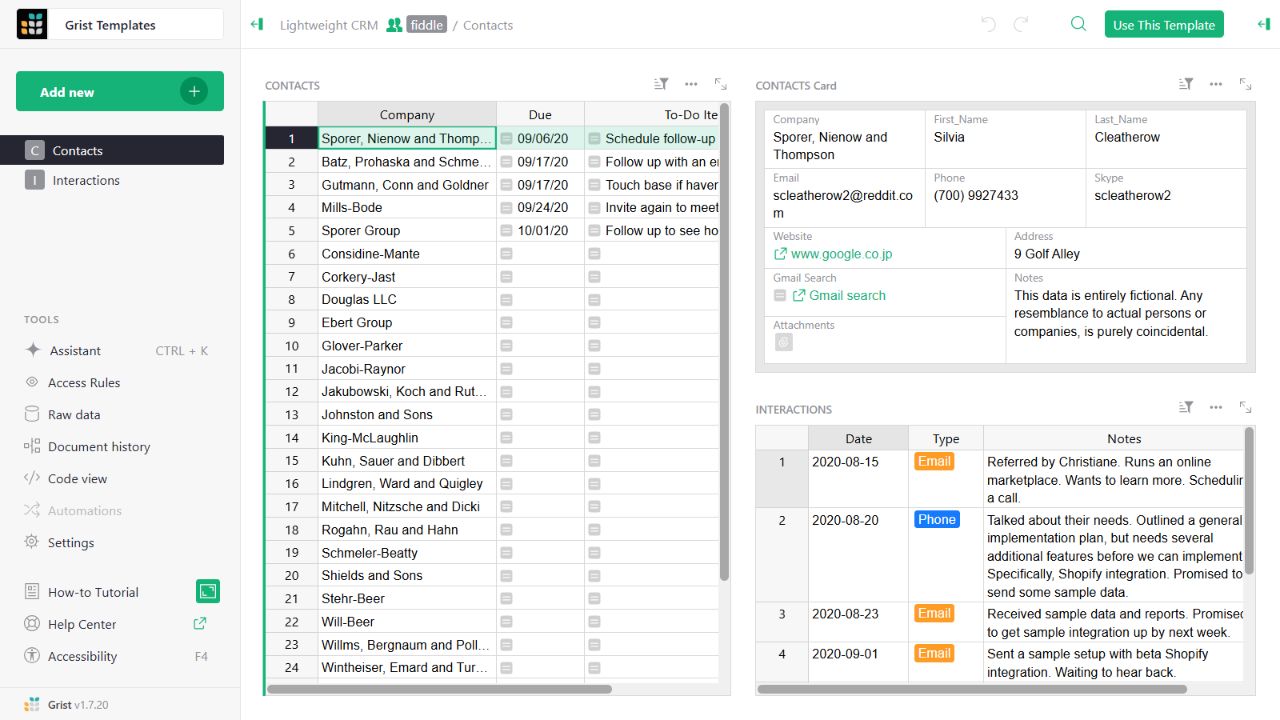
- Contact gridThe left widget lists sample companies and follow-up tasks.
- Detail cardThe upper-right widget presents fields for the selected contact.
- Related interactionsThe lower-right widget displays the sample interaction history.
Check the facts and their boundaries.
Official documentation supports the product statements. The evaluation procedures and synthetic examples are editorial guidance. We have not independently run the installation, migration or recovery procedures described here.
Supported imports, preview and existing-record merge behavior; not an independently tested migration. Reviewed 2026-11-01.