
Baserow
A candidate for teams organizing shared work in structured tables. Evaluate the import path, edition and operating responsibilities before replacing an existing workspace.
Investigate Baserow when you want to build a shared table-based workflow and can rehearse your existing data in a separate workspace.
An importer is not a guarantee that formulas, automations and permissions will survive unchanged.
What the documentation establishes.
These are source-backed statements. The scope column keeps an edition claim separate from a test result.
| Question | Documented answer | Scope and source |
|---|---|---|
| Core licence | The repository identifies its Open Source Edition as MIT Expat, with separate terms for premium and enterprise directories. | Repository develop branch; not a licence determination for every packaged edition.Read primary source ↗ |
| Application architecture | The technical introduction describes a Django backend, a Nuxt/Vue frontend and PostgreSQL persistence. | Documented architecture; no resource benchmark performed.Read primary source ↗ |
| Airtable migration | The official importer creates an import report for incomplete transfers. Formula, lookup and rollup fields require recreation according to the guide. | Current documentation; no independent migration result claimed.Read primary source ↗ |
Ask these first.
- Which fields and calculations must keep their meaning?
- Which permissions does the intended edition provide?
- Who will maintain the application, database and attached files?
Our evaluation approach: a candidate stays on the shortlist only when it meets your essential workflow and your team can maintain it. This is editorial guidance, not a product test score.
Make the choice observable.
- Create a small synthetic customer-and-project dataset with stable IDs.
- Include a linked record, a calculation, a file and a restricted-access user.
- Review the import report and record each manual repair.
- Compare totals, relationships and calculated outputs against the source.
- Restore the destination from backup before accepting the workflow.
Suggested evaluation steps. This site has not completed this rehearsal or measured its success rate.
Choose the guide for your next task.
Baserow Airtable Import: Check What Survives
Plan an Airtable-to-Baserow import, read the import report, rebuild unsupported behavior and verify the destination before cutover.
Read the workflow ↗Workflow guideBaserow CSV Import Without Duplicate Surprises
Map CSV fields, preserve identifiers and distinguish append from update when bringing recurring data into an existing Baserow table.
Read the workflow ↗Workflow guideBaserow Linked Records: Model Relationships
Build a Baserow relationship with stable identifiers, clear cardinality and checks that distinguish linked records from copied display text.
Read the workflow ↗Workflow guideBaserow Formulas: Validate the Business Rule
Translate a business calculation into a Baserow formula, check field references and validate edge cases before using the results operationally.
Read the workflow ↗Technical referenceBaserow Lookup vs Rollup: Choose the Result
Distinguish displaying related values from aggregating them, then verify linked records and totals in a small Baserow example.
Read the workflow ↗Technical referenceBaserow Database Tokens: Scope Each Integration
Choose database-token permissions for a Baserow integration and verify both allowed and denied operations without sharing account credentials.
Read the workflow ↗Technical referenceBaserow API Pagination: Retrieve the Complete Set
Plan a complete Baserow API read with explicit pagination, stable identifiers, reconciliation and error handling instead of exporting only page one.
Read the workflow ↗Workflow guideBaserow Forms: Design and Verify an Intake Flow
Turn a Baserow table into a focused intake form, separate submitted fields from internal processing and check what an outside visitor can do.
Read the workflow ↗Technical referenceBaserow Views: Separate Layout from Access
Use views to organize one Baserow table without mistaking a filter, hidden field or personal layout for an authorization boundary.
Read the workflow ↗Workflow guideBaserow Permissions: Build an Access Test Matrix
Translate team roles into Baserow access requirements, verify the intended edition and test allowed and denied actions with separate accounts.
Read the workflow ↗Workflow guideBaserow Backup and Restore: Define Recovery
Inventory a self-hosted Baserow installation, select the release-matched backup procedure and design a restoration rehearsal with explicit checks.
Read the workflow ↗Workflow guideBaserow Upgrade Checklist: Plan the Way Back
Prepare a version-aware Baserow upgrade with dependency checks, a recovery point, workflow acceptance tests and a realistic rollback decision.
Read the workflow ↗Inspect the interface, with its context.
Open a specimen to see the source image and the observations it supports. A vendor demonstration is distinct from a self-hosted installation.
BaserowOfficial live template · Demo version not disclosed
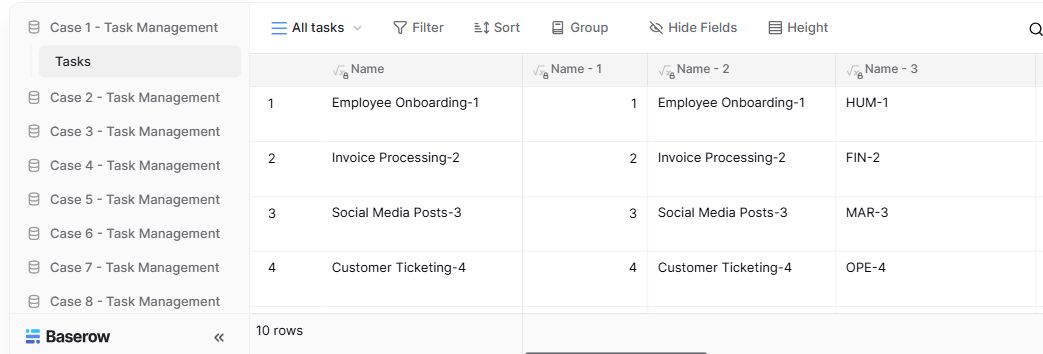
- Table navigationThe sidebar separates the demo’s task-management examples.
- View controlsFilter, sort, group and hide-field controls are visible in this preview.
- Calculated fieldsFormula columns display generated task names and identifiers.
Evidence we are still building.
We have not established independent resource measurements, migration completeness, restore reliability or a full edition-by-edition permission matrix. The interface evidence above retains its original capture date and version; it is not a new installation test.