
Choose and verify an import method that preserves field meaning and prevents accidental repeated records.
Choose the destination before the file
The official existing-table import guide distinguishes appending records from updating matched records. It also distinguishes importing into a configured table from creating a new table, where initial fields start as text. Pick the method according to whether you already have a schema and whether the incoming rows represent new or existing entities.
Hypothetical example: a monthly supplier file contains Supplier ID, ZIP Code, Invoice Date and Amount. IDs and ZIP codes are identifiers, even when they contain only digits. Converting 00127 to 127 changes the identifier. Treat the amount as a numeric measure, and record the intended date interpretation separately.
Documentation: Baserow: Import into an existing table
Prepare a field-mapping worksheet
Do not rely on similar headings to establish similar meaning. A column called Value may represent currency, quantity or a score. Write down its unit and the handling of empty values. Distinguish an empty value from zero when downstream calculations use that distinction.
For recurring files, define the unique matching key and inspect duplicates inside the file before updating the destination. A key that is unique today may stop being unique if the supplier changes its export. If no stable key exists, pause and define a reconciliation method rather than guessing from display names.
- Save an unchanged source copy and count its data records.
- Build or inspect the destination field types and map each imported column.
- Try a small sample containing a leading zero, a missing date and a duplicate key.
- Choose append or update intentionally and review the preview.
- Verify matched, added and unresolved records against the source copy.
Make the second run predictable
The important test for a recurring import is what happens when the same sample is processed twice. If the job is intended to update a supplier list, the second run should not create a second supplier for every existing key. This is a proposed acceptance exercise, not a tested guarantee about every import option.
Keep an import log containing the file name, source period, destination, mapping changes, row totals and reviewer. Do not report only the destination total: a missing row and an accidental extra row can cancel each other. Compare the set of stable identifiers as well.
If a file has changed schema, perform the mapping review again. An added column is easy to spot; a renamed column with a different unit can be more dangerous. Keep failed or ambiguous rows in a separate repair list until a person resolves their intended meaning.
Hypothetical supplier CSV mapping
This is an illustrative worksheet to adapt to your own evaluation. It is not a measured product test or a claim about results in your installation.
| CSV column | Destination meaning | Rehearsal check |
|---|---|---|
| Supplier ID | Stable text identifier | 00127 remains 00127 |
| ZIP Code | Postal text | Leading zeros preserved |
| Invoice Date | Date with agreed format | Ambiguous dates reviewed |
| Amount | Numeric currency amount | Unit and missing values documented |
A repeatable import has an explicit matching key, a reviewed mapping and a second-run outcome you can explain.
Inspect the official interface evidence
These previously captured interfaces provide orientation. Their versions and dates are distinct from the documentation review above.
Inspect the interface, with its context.
Open a specimen to see the source image and the observations it supports. A vendor demonstration is distinct from a self-hosted installation.
BaserowOfficial live template · Demo version not disclosed
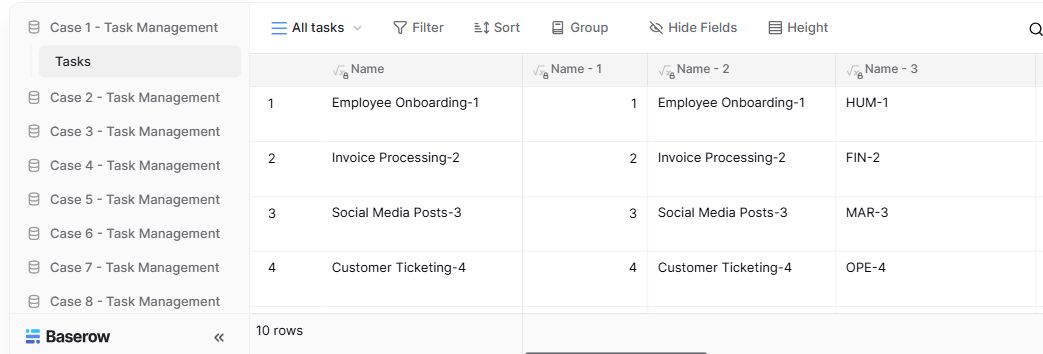
- Table navigationThe sidebar separates the demo’s task-management examples.
- View controlsFilter, sort, group and hide-field controls are visible in this preview.
- Calculated fieldsFormula columns display generated task names and identifiers.
Check the facts and their boundaries.
Official documentation supports the product statements. The evaluation procedures and synthetic examples are editorial guidance. We have not independently run the installation, migration or recovery procedures described here.
Official field mapping and append/update guidance; behavior must match the installed release. Reviewed 2026-11-01.