
Collect the required record data while keeping the public intake and internal workflow boundaries clear.
Design the row before the questions
Baserow documents Form view as a way to create rows from submissions. Its guide excludes calculated or generated field types from ordinary form inputs. Treat the form as one entry point into a table, with internal processing fields handled separately.
Hypothetical example: a workshop collects a participant name, contact address and selected session. The staff later records review status and attendance. Those staff fields serve a different role from the participant’s answers. Do not ask the participant to set their own approval status merely because the destination table has that column.
Documentation: Baserow: Form view
Keep the public task small and understandable
Write labels that explain what to enter, and make the consequence of submission clear. If the response is a request rather than a confirmed booking, say so near the submit action. A polite success message should not imply capacity or payment was confirmed by a process that has not happened.
Use a synthetic submission fixture that includes a long name, an optional field left blank and an invalid contact format. Decide which cases should be accepted, rejected or routed to review. Required fields should reflect a real downstream need rather than a desire to collect everything.
- Identify the public inputs and separate them from internal processing fields.
- Configure the form through the current installed interface.
- Open the shared form in a separate signed-out browser context.
- Submit synthetic normal, incomplete and invalid examples.
- Inspect the created records and the exact message the visitor receives.
Review access and post-submission behavior
An intake form, a public data view and a workspace membership are different access paths. Review the actual link being distributed. Do not infer that because a visitor can submit one record they should be able to browse the table, and do not assume that a hidden form input establishes a general access control.
Keep internal notes out of prefilled URLs. URLs can be copied into chat, browser history or analytics systems, so use them only for information suitable for that sharing context. Test how a forwarded link behaves before relying on a link as an invitation to a particular person.
Finally, assign the review queue. Someone must notice incoming records, correct unusable answers and handle duplicates. A form that writes rows successfully can still fail the business task if no one receives or reviews the work. This guide proposes an intake rehearsal; it does not establish the abuse resistance or legal suitability of a public endpoint.
Hypothetical workshop intake checks
This is an illustrative worksheet to adapt to your own evaluation. It is not a measured product test or a claim about results in your installation.
| Case | Expected behavior | Destination check |
|---|---|---|
| Complete session request | Clear request acknowledgment | One row with chosen session |
| Missing optional detail | Submission can proceed | Blank retains its meaning |
| Invalid required input | Clear correction guidance | No unusable accepted record |
| Forwarded public link | Reviewed intended access | No internal notes exposed |
Validate the visitor’s task and the staff’s resulting workflow as two parts of the same intake process.
Inspect the official interface evidence
These previously captured interfaces provide orientation. Their versions and dates are distinct from the documentation review above.
Inspect the interface, with its context.
Open a specimen to see the source image and the observations it supports. A vendor demonstration is distinct from a self-hosted installation.
BaserowOfficial live template · Demo version not disclosed
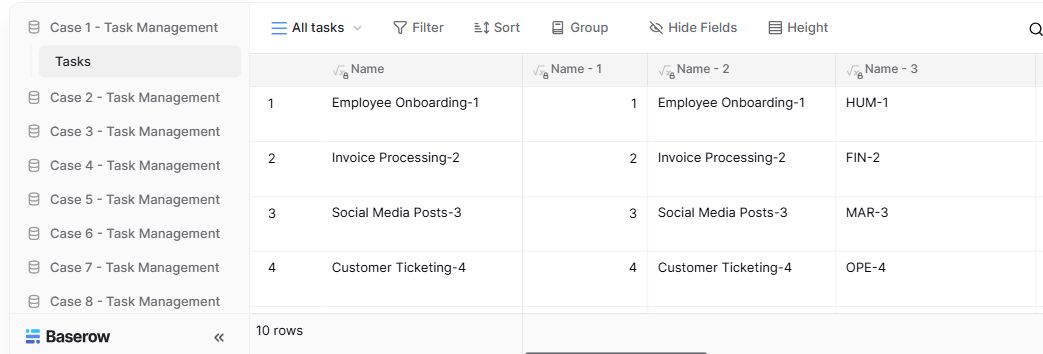
- Table navigationThe sidebar separates the demo’s task-management examples.
- View controlsFilter, sort, group and hide-field controls are visible in this preview.
- Calculated fieldsFormula columns display generated task names and identifiers.
Check the facts and their boundaries.
Official documentation supports the product statements. The evaluation procedures and synthetic examples are editorial guidance. We have not independently run the installation, migration or recovery procedures described here.
Documented form submissions and calculated-field behavior; plan-specific options need separate confirmation. Reviewed 2026-11-01.