
Evaluate an upgrade as a controlled application-and-data change rather than a container replacement alone.
Map the whole upgrade path
The official Docker instructions recommend backing up before upgrading. The Compose documentation also includes version-dependent database upgrade notes. These establish why the path from the installed release matters; they do not justify applying current commands to every historical installation.
Write down the current image, target image, database version, deployment topology and custom configuration. If several releases are being skipped, inspect the relevant intermediate notes. A change that is routine for a recent installation may require additional preparation for an older one.
Documentation: Baserow: Install with Docker · Baserow: Docker Compose installation source
Choose a small set of critical workflows
Hypothetical example: a service business depends on submitting a job form, assigning a customer relationship and exporting an invoice queue. Those tasks become the acceptance set. Record a synthetic before-state for each so the reviewer knows what correct behavior looks like after the change.
Separate a healthy process from a usable application. A container can be running while an integration token, file link or business calculation is broken. Review logs and service health, then complete the workflow checks from the appropriate user roles.
- Read official instructions for the installed and target deployment versions.
- Prepare and review a recoverable pre-change backup.
- Rehearse the change in an isolated copy where practical.
- Agree maintenance timing, expected interruption and decision owner.
- Apply the release-matched upgrade procedure and inspect failures.
- Run the acceptance set, then accept the change or start the documented recovery path.
Define rollback around the data state
A rollback decision needs a time limit and a recovery method. If the application has changed the database schema, starting an older image against the changed data may not be supported. Use the release documentation to decide whether recovery means restoring the pre-change data rather than simply changing an image tag.
Avoid accepting new business edits in an uncertain state without deciding how they would be preserved if recovery becomes necessary. A rollback to yesterday’s backup can discard today’s work. Assign a person to capture or replay any approved intervening edits, and make that risk part of the decision.
Keep the old version references, configuration record, backup location and acceptance results with the change log. The next operator should not have to reconstruct the history from chat messages. This checklist is an editorial operating method; no upgrade or rollback has been executed or timed by this site. It is complete as a planning guide, not a tested command sequence for your server.
Proposed upgrade decision record
This is an illustrative worksheet to adapt to your own evaluation. It is not a measured product test or a claim about results in your installation.
| Gate | Evidence | Decision owner |
|---|---|---|
| Before change | Versions, release notes and recovery point | Operator |
| Rehearsal | Critical tasks pass in isolated copy | Workflow reviewer |
| After change | Health plus user/API/file checks | Release owner |
| Recovery decision | Data state and intervening edits accounted for | Named approver |
An upgrade is ready when the target workflow and the recovery decision are both explicit.
Inspect the official interface evidence
These previously captured interfaces provide orientation. Their versions and dates are distinct from the documentation review above.
Inspect the interface, with its context.
Open a specimen to see the source image and the observations it supports. A vendor demonstration is distinct from a self-hosted installation.
BaserowOfficial live template · Demo version not disclosed
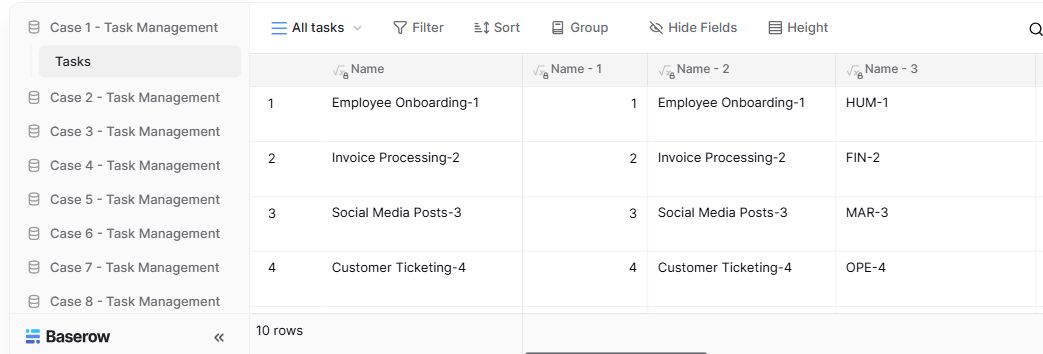
- Table navigationThe sidebar separates the demo’s task-management examples.
- View controlsFilter, sort, group and hide-field controls are visible in this preview.
- Calculated fieldsFormula columns display generated task names and identifiers.
Check the facts and their boundaries.
Official documentation supports the product statements. The evaluation procedures and synthetic examples are editorial guidance. We have not independently run the installation, migration or recovery procedures described here.
Official all-in-one installation, backup and upgrade instructions; not an executed restore. Reviewed 2026-11-01.
Develop-branch documentation, including version-dependent PostgreSQL upgrade notes; use release-matched instructions. Reviewed 2026-11-01.