
Move an Airtable workflow while identifying compatibility losses rather than accepting a successful import as completion.
Separate data transfer from workflow transfer
Baserow documents an Airtable importer that adds a report for items it could not fully transfer. Its guide identifies formulas, lookups and rollups among fields needing recreation. A table that opens successfully can therefore be an incomplete replacement. Read those compatibility notes before promising a switch date.
Start with a migration inventory: table names, stable record identifiers, relationships, calculation rules, files, interfaces and scheduled actions. Mark each item as transferred, rebuilt, intentionally retired or unresolved. This inventory is an editorial planning method; it is not a claim that this site has migrated your base.
Documentation: Baserow: Import your Airtable base
Run a small, separate rehearsal
Hypothetical example: a studio has Clients and Projects tables. A project links to a client, stores a proposal file and calculates its remaining budget. Copy a synthetic version of that structure. Include two similar client names so a mistaken relationship is visible. Do not make real client information public merely to try an importer.
- Prepare a separate destination and record the source tables and row counts.
- Follow the current official import flow for the source access method you are authorized to use.
- Read every import-report entry and assign an owner to each required repair.
- Rebuild the budget calculation from its business rule, then compare expected results.
- Check the relationship and open each sample file from the destination.
Write acceptance tests before cutover
A useful acceptance rule describes the work a person must still be able to complete. “A coordinator can find a client, create a project and see the correct remaining budget” is more informative than “the database imported.” Give each critical workflow a known starting record, expected outcome and reviewer.
Choose a final source-of-truth window. If the source keeps changing during validation, a destination mismatch may reflect a new edit rather than failed conversion. Agree which edits are frozen or replayed, retain the original and record a rollback decision. Do not remove the source until the migration owner accepts the verified destination.
If a calculation cannot be reproduced, document the difference beside the affected field. A manually typed replacement value can preserve a report for reference, but it does not preserve the original rule for future records. Treat that as a changed workflow rather than successful automation transfer.
Hypothetical migration repair log
This is an illustrative worksheet to adapt to your own evaluation. It is not a measured product test or a claim about results in your installation.
| Component | Check | Acceptance record |
|---|---|---|
| Client relationship | Open the linked client from two projects | Correct stable client ID |
| Budget formula | Compare positive, zero and missing-input cases | Expected results recorded |
| Proposal file | Open destination attachment | Readable sample file |
| Automation | Recreate or intentionally retire | Named owner and decision |
Accept the workflow only after the import report, rebuilt behavior and representative records agree with the migration inventory.
Inspect the official interface evidence
These previously captured interfaces provide orientation. Their versions and dates are distinct from the documentation review above.
Inspect the interface, with its context.
Open a specimen to see the source image and the observations it supports. A vendor demonstration is distinct from a self-hosted installation.
BaserowOfficial live template · Demo version not disclosed
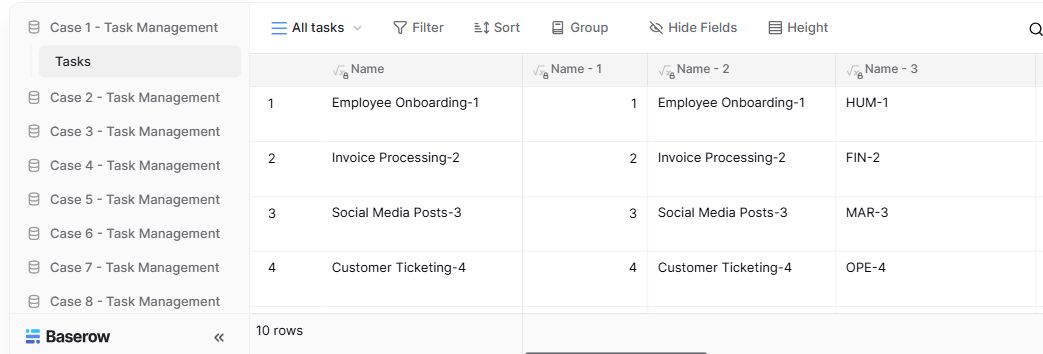
- Table navigationThe sidebar separates the demo’s task-management examples.
- View controlsFilter, sort, group and hide-field controls are visible in this preview.
- Calculated fieldsFormula columns display generated task names and identifiers.
Check the facts and their boundaries.
Official documentation supports the product statements. The evaluation procedures and synthetic examples are editorial guidance. We have not independently run the installation, migration or recovery procedures described here.
Official importer instructions and compatibility notes; not an independently executed migration. Reviewed 2026-11-01.