
Model a relationship whose meaning remains clear when names change or records are duplicated.
Define the relationship in plain language
Baserow documents a Link-to-table field that connects a row to other rows, including rows in the same table. It creates a corresponding relationship field in the target table. This is different from copying a customer name into an order: the relationship points to the chosen record.
Write the rule before creating fields. “Each booking belongs to one customer; a customer can have several bookings” describes a different model from “several customers can participate in a booking.” The second case may need an explicit participation table if you also track each person’s attendance or payment.
Documentation: Baserow: Link-to-table field
Use a small relationship fixture
Hypothetical example: Customers contains C-101 and C-102, both displayed as Alex Morgan. Bookings contains B-201 and B-202. Make the stable customer ID visible during selection so the editor can choose the intended person. A familiar name alone is not enough evidence.
After establishing the relationship, change the display name in the customer record and inspect the booking. Then unlink and relink one sample booking. Record which relationship should change and which should remain. These are evaluation steps to carry out in a test copy, not reported test results.
- Create the two tables with independent stable IDs.
- Add a Link-to-table field to the child workflow table.
- Choose the target table and permitted relationship behavior in the installed interface.
- Link a sample row to the intended target, then inspect the corresponding target relationship.
- Try an ambiguous display name and verify the selected stable ID.
Avoid relationships that hide business history
A link to a customer’s current address may be useful for contact management, but an issued invoice may need the address that applied when it was issued. In that workflow, a deliberate snapshot field can be correct. The choice is about business meaning, not whether duplication is always bad.
Likewise, do not delete a target row merely because it is inactive. Decide how the system should represent archived customers and historical bookings. A record can be unavailable for new work while remaining important to past activity. Review your retention requirements before changing the model.
Once the relationship behaves correctly, add a lookup when you need to display related information or a rollup when you need a summary. Building those calculations before checking the links makes a plausible-looking total harder to diagnose.
Hypothetical relationship specification
This is an illustrative worksheet to adapt to your own evaluation. It is not a measured product test or a claim about results in your installation.
| Question | Example rule | Verification |
|---|---|---|
| How many targets? | One customer per booking | No unintended second customer |
| What identifies a target? | Customer ID, not name | C-101 differs from C-102 |
| Current or historical value? | Invoice address is a snapshot | Old invoice retains its meaning |
| What happens on archive? | Keep history, stop new selection | Past bookings remain interpretable |
Verify the identity and meaning of the relationship before relying on the values calculated through it.
Inspect the official interface evidence
These previously captured interfaces provide orientation. Their versions and dates are distinct from the documentation review above.
Inspect the interface, with its context.
Open a specimen to see the source image and the observations it supports. A vendor demonstration is distinct from a self-hosted installation.
BaserowOfficial live template · Demo version not disclosed
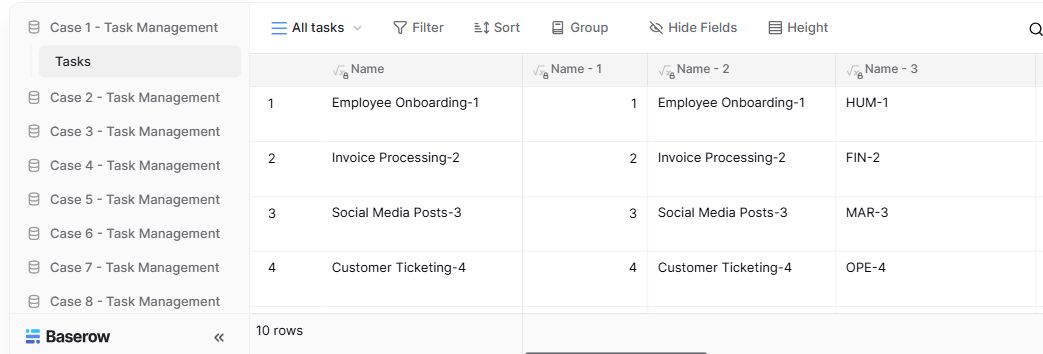
- Table navigationThe sidebar separates the demo’s task-management examples.
- View controlsFilter, sort, group and hide-field controls are visible in this preview.
- Calculated fieldsFormula columns display generated task names and identifiers.
Check the facts and their boundaries.
Official documentation supports the product statements. The evaluation procedures and synthetic examples are editorial guidance. We have not independently run the installation, migration or recovery procedures described here.
Documented relationships and linked-record selection. Reviewed 2026-11-01.