
Choose a lookup or aggregation according to the answer the reader needs, with an example that exposes incorrect relationships.
Ask whether you need values or a summary
Baserow documents Lookup as a read-only display of a field reached through an existing Link-to-table field. Rollup also uses a link, but calculates a result over related values. Its aggregation must suit the value type; summing monetary amounts is a different task from displaying email addresses.
The simplest decision is to finish this sentence: “For each project, show…” If the answer is “the names of its assigned people,” you need related values. If it is “the total approved hours,” you need a defined summary. Avoid introducing a calculated total without agreeing which records belong in it.
Documentation: Baserow: Lookup field · Baserow: Rollup field
Work through an intentionally small project
Hypothetical example: Project P-101 has three time entries: two approved entries of 2 and 3 hours, and one draft entry of 4 hours. An all-entry total is 9 hours; an approved-only total is 5. Both sums are arithmetically correct, but they answer different questions.
Use the link field to inspect which time entries participate. Then decide where approval filtering belongs in your model and whether the installed feature supports it. Do not label a total “billable” merely because its underlying rows contain hours. That label implies a rule about approval and billing eligibility.
- Confirm each time entry links to the correct project.
- Use a lookup when reviewing the related source values individually.
- Choose the intended summary function for the numeric field.
- Compare the summary with an independently computed expected total.
- Add and remove one sample relationship to check which result should change.
Diagnose the source before the calculation
When a total is too high, first inspect duplicate or unintended links. A correct sum over the wrong set of rows remains the wrong business answer. When a lookup is empty, inspect the relationship and the source field rather than typing over a derived result.
A lookup should not be treated as a historical snapshot. If your workflow requires an issued document to preserve an old name or address, model that history deliberately. The current related value and the value used at issuance may both be necessary.
Keep the expected participation list with the acceptance record. A bare total is hard to audit later; a list of entry IDs and the reason each was included explains the result and makes a disputed number easier to resolve.
Hypothetical project-summary decision
This is an illustrative worksheet to adapt to your own evaluation. It is not a measured product test or a claim about results in your installation.
| Question | Approach | Check |
|---|---|---|
| Who contributed? | Lookup related names | Compare entry IDs and names |
| How many hours were recorded? | Sum the defined entry set | 2 + 3 + 4 = 9 |
| How many hours were approved? | Model the approval rule | 2 + 3 = 5 |
| Why is the total wrong? | Inspect participation first | Duplicate or unrelated entry |
Choose the result shape first, then verify the participating records and the calculation independently.
Inspect the official interface evidence
These previously captured interfaces provide orientation. Their versions and dates are distinct from the documentation review above.
Inspect the interface, with its context.
Open a specimen to see the source image and the observations it supports. A vendor demonstration is distinct from a self-hosted installation.
BaserowOfficial live template · Demo version not disclosed
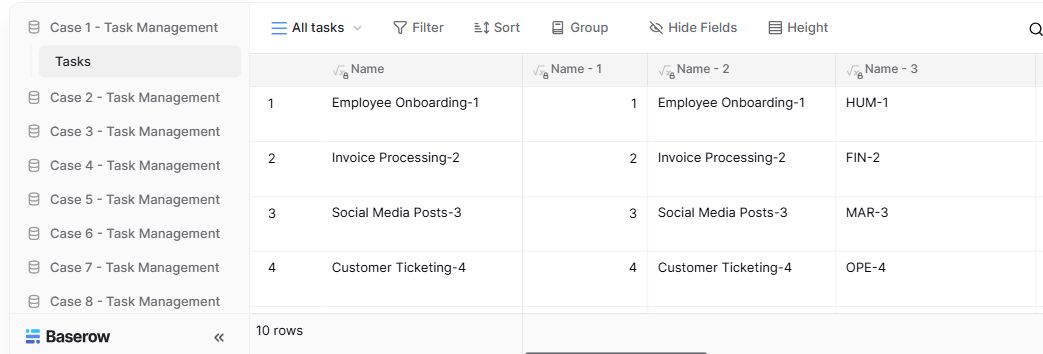
- Table navigationThe sidebar separates the demo’s task-management examples.
- View controlsFilter, sort, group and hide-field controls are visible in this preview.
- Calculated fieldsFormula columns display generated task names and identifiers.
Check the facts and their boundaries.
Official documentation supports the product statements. The evaluation procedures and synthetic examples are editorial guidance. We have not independently run the installation, migration or recovery procedures described here.
Read-only lookup behavior and linked-field prerequisites. Reviewed 2026-11-01.
Aggregation of related records and function/type compatibility. Reviewed 2026-11-01.