
Design useful table views while distinguishing presentation configuration from verified data access.
Keep one table and multiple working layouts
Baserow’s official views overview describes different presentations of the same underlying table, with independent view settings. Editing a record is a data change, whereas changing a view’s filter changes its presentation. The overview also distinguishes collaborative, personal and restrictive view concepts; availability needs checking for the chosen edition.
Hypothetical example: a service team works from one Jobs table. Dispatch needs today’s scheduled work, finance needs unbilled jobs, and a manager needs outstanding follow-ups. Separate layouts can help each person without maintaining three copied job lists that gradually disagree.
Documentation: Baserow: Views overview
Specify what each view is for
Give a shared view a task-based name and a short rule: “Unbilled completed jobs” is clearer than “Main copy 3.” Define which state transitions should make a row appear or disappear. If a row vanishes after editing, the filter may have become false rather than the data being deleted.
Test with synthetic jobs in several states. Change one job from Scheduled to Complete and inspect the relevant views. Record the expected movement. A view is useful when staff can predict what it shows and explain a missing record.
- Identify the workflow decision each view supports.
- Choose fields, ordering and filters appropriate to that decision.
- Create sample rows that should appear and sample rows that should not.
- Change a sample state and inspect the resulting view membership.
- Document who may change the shared configuration.
Use a separate access review for restricted data
The permission documentation describes plan-dependent authorization features. If a dispatcher must not read financial information, an ordinary presentation setting is not the acceptance test. Identify every relevant path: another view, a direct table link, a shared link and an integration credential.
Documentation: Baserow: Permissions overview
Diagnose layout problems before copying data
When a colleague cannot find a job, first compare the table, filter, sort and active view. Creating a second table to “fix” a filter issue introduces a new synchronization problem. Keep the stable row ID in the troubleshooting record so both people can discuss the same entity.
Reserve a clearly documented recovery path for accidental configuration changes, such as a known baseline view whose purpose is understood by its maintainers. Do not turn that baseline into a broader permission grant. Layout recovery and access authorization are different decisions.
This guide explains a view-design method. It does not certify row-level isolation, validate a particular plan or report a completed user-access test. Those claims require the actual edition and accounts.
Hypothetical Jobs view specification
This is an illustrative worksheet to adapt to your own evaluation. It is not a measured product test or a claim about results in your installation.
| View | Membership rule | Separate check |
|---|---|---|
| Today’s dispatch | Scheduled date is today | Dispatcher’s actual access |
| Unbilled completed | Complete and not invoiced | Finance-role authorization |
| Follow-up queue | Follow-up remains open | Owner and next-action field |
| Missing-job diagnosis | Inspect stable row ID | Filter versus deleted record |
Use views to make work clearer, and use an explicit permission test to establish who can access the data.
Inspect the official interface evidence
These previously captured interfaces provide orientation. Their versions and dates are distinct from the documentation review above.
Inspect the interface, with its context.
Open a specimen to see the source image and the observations it supports. A vendor demonstration is distinct from a self-hosted installation.
BaserowOfficial live template · Demo version not disclosed
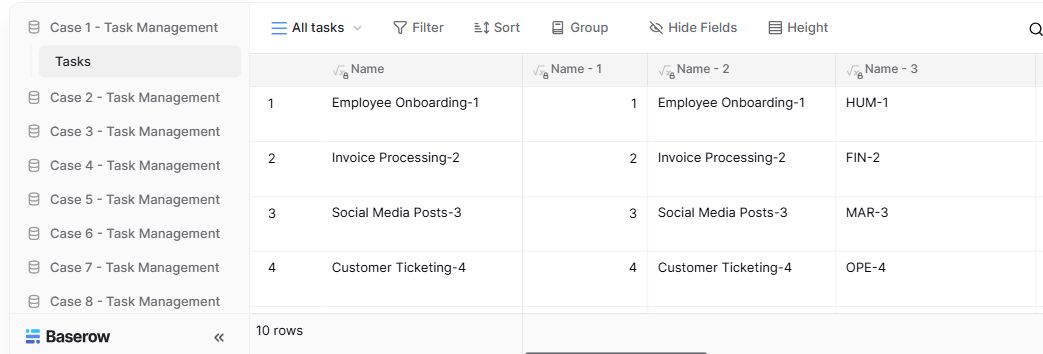
- Table navigationThe sidebar separates the demo’s task-management examples.
- View controlsFilter, sort, group and hide-field controls are visible in this preview.
- Calculated fieldsFormula columns display generated task names and identifiers.
Check the facts and their boundaries.
Official documentation supports the product statements. The evaluation procedures and synthetic examples are editorial guidance. We have not independently run the installation, migration or recovery procedures described here.
Official search-indexed article body read; direct-page retrieval timed out. Basic view model only, not a complete current entitlement matrix. Reviewed 2026-11-01.
Basic versus granular roles as described by the current documentation; verify purchased/self-hosted entitlement. Reviewed 2026-11-01.