
Keep your current workflow as the baseline
Document your essential tables, formulas, forms, attachments and integrations. A visual similarity between products does not establish compatibility.
Include the work of operating the replacement
Server setup, monitoring, updates and recovery require an owner. Evaluate that ongoing responsibility alongside any subscription changes.
Prove the migration before committing
Use a non-sensitive sample, validate records and relationships, and preserve a rollback path. Exact import support and edition-specific limits must be checked in current official documentation.
Compare the workflow, not an assumed feature checklist
Use the Airtable base you already depend on as the source baseline. Record the exact fields, views, forms, calculations and automations in use. Then check the intended Baserow edition against that list. This comparison does not presume that your current Airtable plan, another team’s plan and a public demo expose identical capabilities.
Inspect the import report before judging parity
Baserow’s documented import path can produce a report describing incomplete transfers. In particular, the guide identifies calculated field types that require recreation. Check that the recreated calculations return the right values and update after changes. A copied result can make an initial screenshot look correct while losing the behavior the team relies on.
Make a decision for this team
Baserow is worth evaluating if the intended edition supports your required workflow and you have an owner for operation and recovery. Staying with the present setup can be the better decision when migration losses or maintenance responsibilities outweigh the problem you are solving. We have not established a measured migration success rate, performance winner or universal cost advantage.
- List the constraint that triggered the evaluation.
- Rehearse a small representative base in a separate destination.
- Inspect records, files, calculations and permissions after transfer.
- Accept or repair every material difference before making a real switch.
Build the comparison from your baseline.
| Criterion | Your current Airtable workflow | Baserow candidate |
|---|---|---|
| Required behavior | Record the fields, calculations, forms and automations actually in use. | Check each requirement in the intended edition; parity is not presumed. |
| Import boundary | Preserve a source snapshot and stable record identifiers. | Review the documented import report and manually recreated field behavior. Official importer scope ↗ |
| Operating responsibility | Document the responsibilities and constraints of your existing setup. | A self-hosted choice needs an owner for deployment, maintenance and recovery. Official installation path ↗ |
| Permissions | Write the current allowed and denied actions. | Verify the same actions in the selected edition and configuration. |
| Acceptance | Baseline against which results are reconciled. | Accept only the requirements demonstrated in a representative rehearsal. |
This table supplies an evaluation method. It is not a complete catalogue of either vendor’s plans or features.
Inspect the interface, with its context.
Open a specimen to see the source image and the observations it supports. A vendor demonstration is distinct from a self-hosted installation.
BaserowOfficial live template · Demo version not disclosed
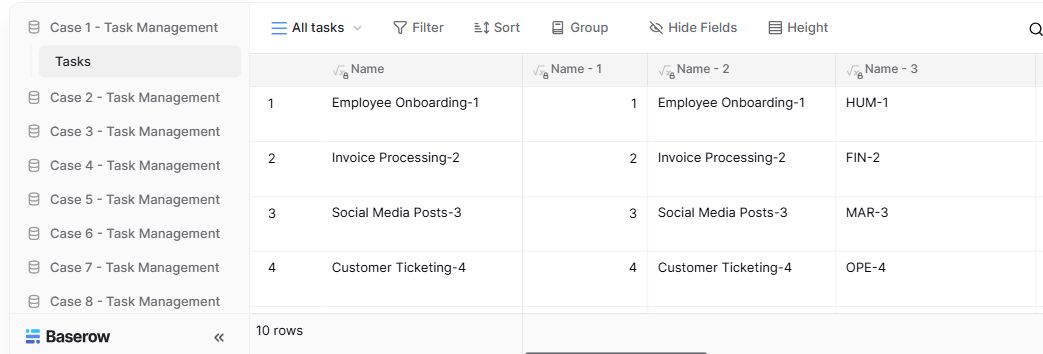
- Table navigationThe sidebar separates the demo’s task-management examples.
- View controlsFilter, sort, group and hide-field controls are visible in this preview.
- Calculated fieldsFormula columns display generated task names and identifiers.
Follow the documentation.
Consult the current official instructions before making changes. No independent deployment benchmark is claimed here.
baserow.ioOfficial documentation ↗support.airtable.comOfficial documentation ↗baserow.ioOfficial documentation ↗